Free and open source · Works offline

Markdown that
feels like Word.

A calm editor for researchers, students and anyone who learned to write in Word. Click and type on the page with the ribbon and shortcuts you know, and Markooj writes plain Markdown that opens anywhere and lasts.

For Windows, macOS and Linux · Free under the AGPL

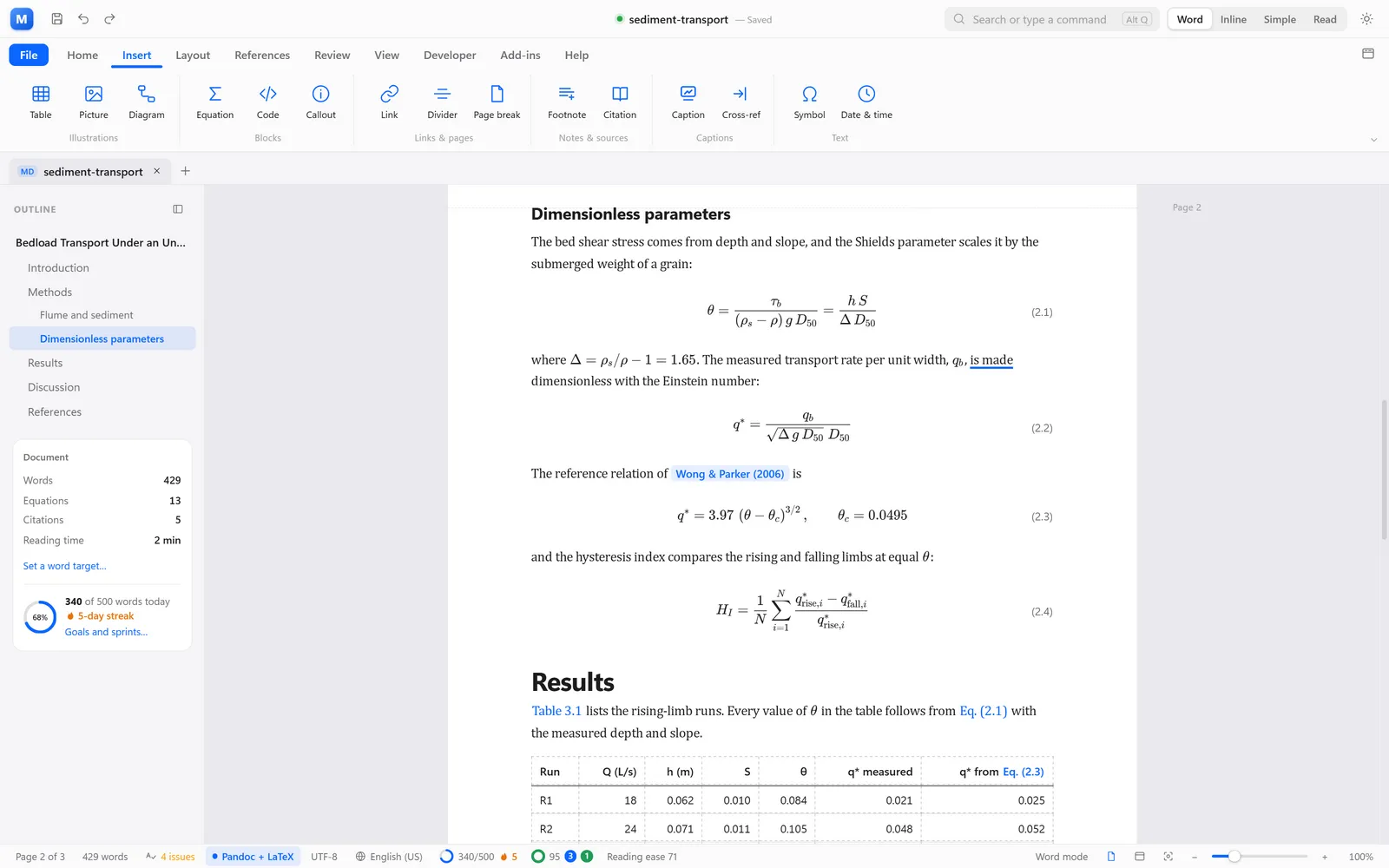
Markooj in Word mode: a research paper with a title, an abstract box and an introduction, the Home tab of the ribbon above it, and an outline of headings on the left.

Four modes, one file

Work the way you like.
Switch any time.

Ctrl+1 to Ctrl+4 change the mode, and your place stays put.

Word mode. Click and type on the page. Numbered equations, citations and tables look finished while you write.

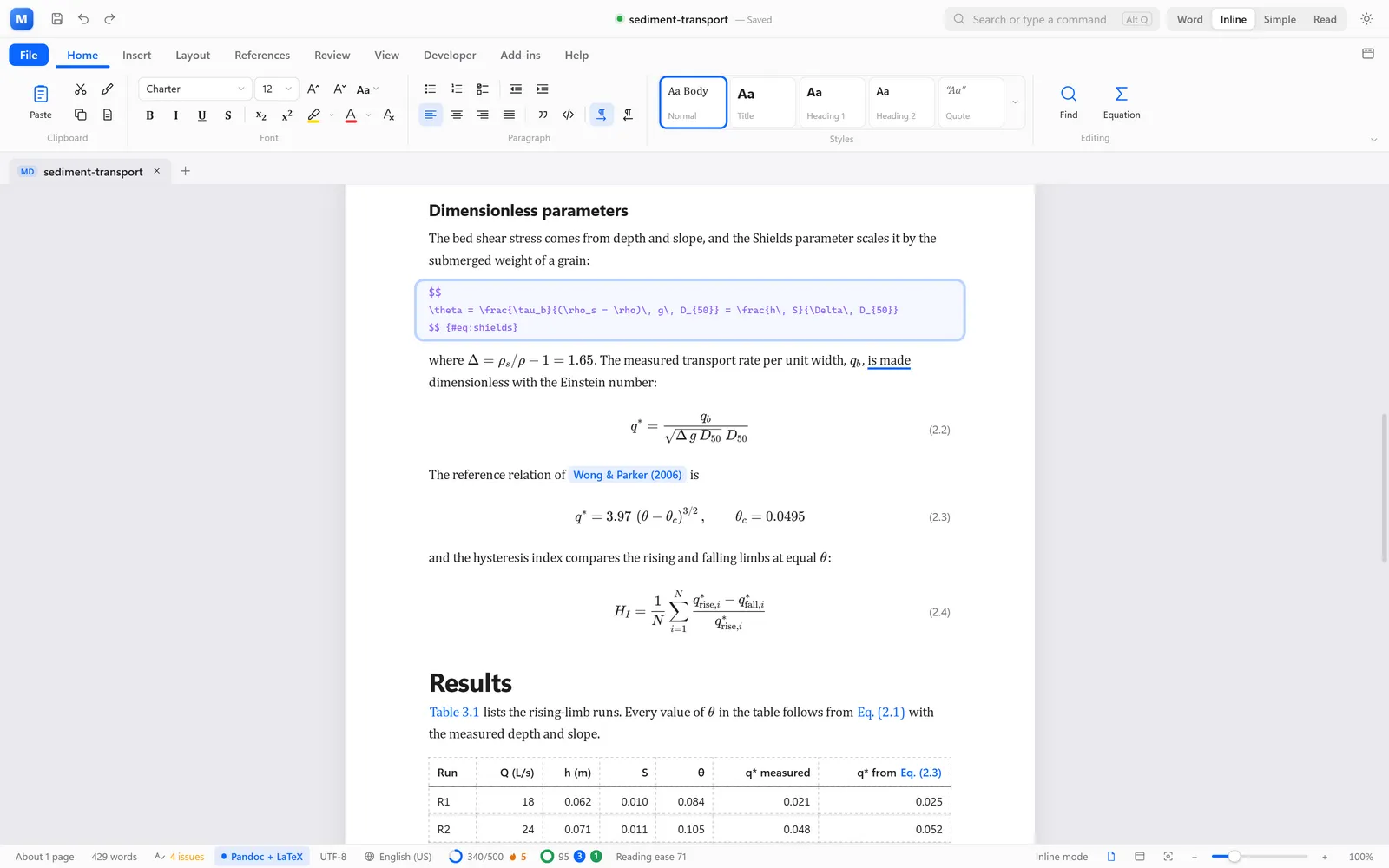
Word mode with the Insert tab open and three numbered display equations on the page, with their numbers in the right margin.

Everything it does

All the tools for a paper.
None of the clutter.

The full list, grouped. Each one is in the offline manual too: press F1 in Markooj.

Writing help

  • Spelling in US and UK English and grammar from Harper, all on your computer.
  • Checks for clarity (long sentences, wordy phrases, passive voice, hidden verbs, undefined abbreviations, mixed spellings), engagement (weak phrases, overused words, repeated sentence starts) and delivery (contractions, hedging, informal words).
  • Over 40 wrong prepositions that are easy to slip on in a second language: discuss about, comprise of, different than.
  • Cards with Accept, Dismiss, Ignore rule, Add to dictionary and Why?, plus Accept all safe fixes and a writing score.
  • Goals for audience, formality and domain (general, academic, business).
  • F7 steps through suggestions like Word's Editor; Alt+F7 jumps to the next one.
  • Synonyms on a double-click and a Thesaurus (Shift+F7) from WordNet; optional word completion.
  • Word count with characters, equations and citations, and a readability report.
  • It never changes your text by itself.

Word-like editing

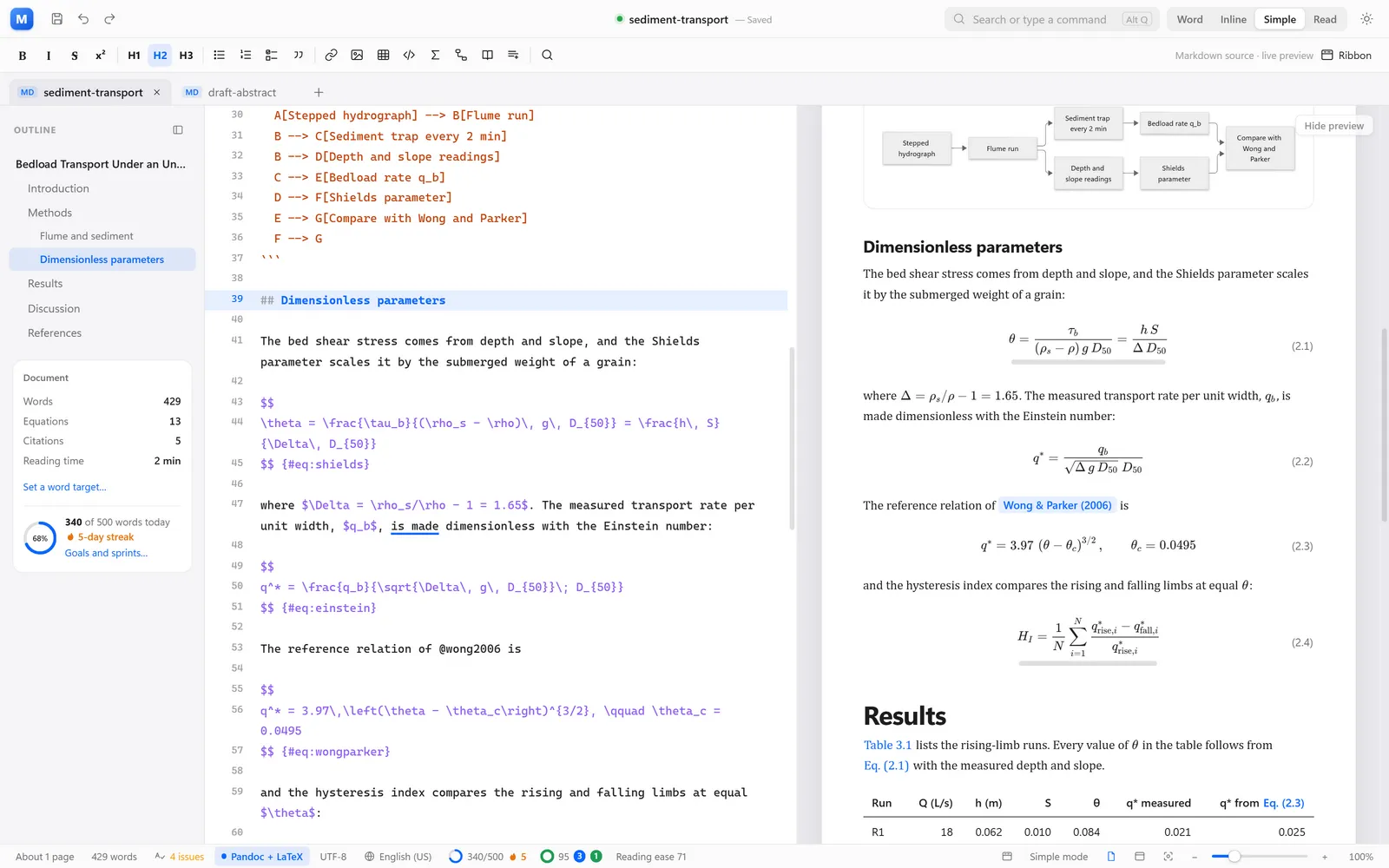
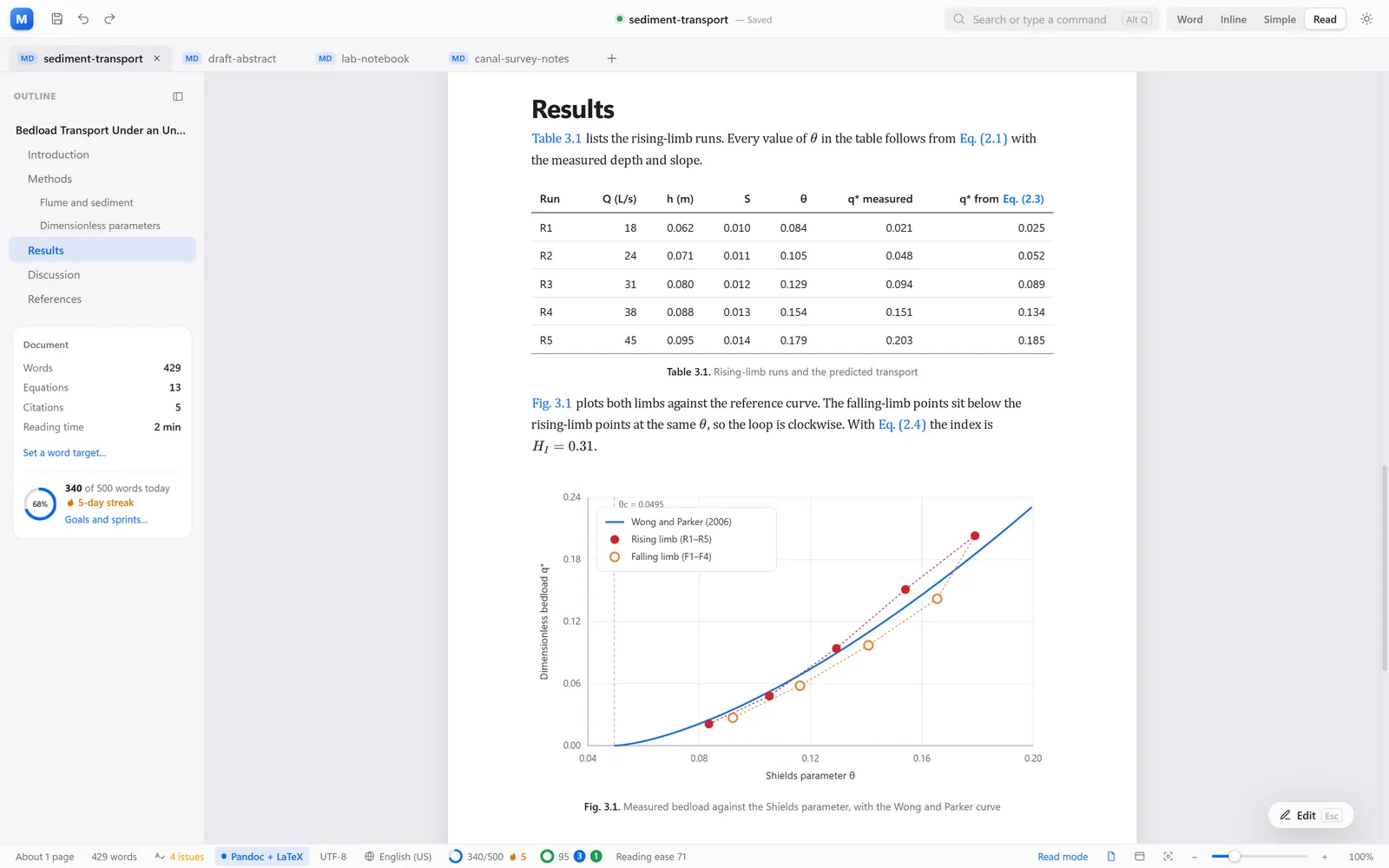
  • Four modes for one file: Word, Inline, Simple and Read (Ctrl+1 to Ctrl+4).
  • A ribbon with File, Home, Insert, Layout, References, Review, View, Developer, Add-ins and Help, ScreenTips on every control, and a reason on every dimmed one. Pin it, show tabs only, or go full screen.
  • Undo one step at a time, Format Painter, Styles, Find and Replace, Go To and Repeat (F4).
  • Change Case with APA and Chicago Title Case; Grow and Shrink Font; one text size per document.
  • AutoCorrect, smart quotes, paste from Word with its formatting, and drag-and-drop pictures.
  • Insert diagrams (Mermaid), code with syntax colors, callouts, links, symbols, dividers, page breaks and the date.
  • Page layout: margins, A4, Letter or A5, one or two columns, spacing and four document themes.
  • Templates: research paper, lab notebook, thesis chapter, meeting notes and literature review.
  • Comments as margin bubbles, hidden notes, and Compare with the saved version.
  • What's this in Markdown? (Ctrl+Shift+/) shows the Markdown behind any selection.

Research and citations

  • One numbering system for equations, figures, tables and sections, in the Pandoc-crossref syntax that Pandoc and Quarto read.
  • Plain (1) or chapter numbers (2.3), a choice of separator and label names, in a margin of their own.
  • Insert Caption and a Cross-reference dialog like Word's. References update themselves, preview on hover, jump on Ctrl+click and show in red with a fix when broken.
  • Citations from a BibTeX library (Zotero, Mendeley, JabRef, EndNote) in APA, Chicago or IEEE, with page numbers and a bibliography that fills itself.
  • Footnotes and a table of contents.
  • File → Info keeps the title, authors, date, keywords and abstract as front matter.

Math

  • A visual equation editor with a LaTeX box kept in step.
  • Palettes for fractions, roots, big operators, brackets, matrices with a size picker, accents, Greek, symbols, arrows and units.
  • Typing shortcuts such as / for a fraction and alpha for α, an on-screen math keyboard, and recent and favorite equations.
  • Inline and display math, with a Numbered switch and a label.
  • Math macros for all documents or one: \newcommand, \renewcommand, \def and \DeclareMathOperator, with a gallery of examples.
  • Equations stay sharp in every export.

Languages and right to left

  • Right-to-left writing with each paragraph finding its own direction, next to English.
  • Right-to-left and Left-to-right buttons on the Home tab (Ctrl+Right Shift, Ctrl+Left Shift).
  • A document language and direction saved in the file and used in every export.
  • Fonts included: Noto Nastaliq Urdu, Noto Naskh Arabic and Vazirmatn.
  • Full Urdu spelling with about 95,000 words, and suggestions that know which letters sound or look alike.
  • Language packs for Urdu, Arabic, Punjabi (Shahmukhi) and Persian, downloaded from GitHub or installed from a file, each checked against its SHA-256 before it installs.

Private and offline

  • No account, no cloud, no analytics and no tracking.
  • Spelling, grammar, the Writing Assistant, the thesaurus, conversions and macros all run on your computer.
  • The internet is used only when you ask: for a language pack or an add-in, for web pictures you allow (off by default), and for links you click.
  • File → Recover keeps the text of every unsaved document for 7 to 90 days, also after a crash.
  • Comments and hidden notes stay out of exports and prints unless you include them.

Make it yours

  • Light and dark themes, or match your system.
  • Document font, default text size, the mode new windows start in, and Print or Web layout.
  • Document tabs at the top, the bottom or the left, an outline of headings, zoom, Focus and typewriter scrolling.
  • Turn each kind of suggestion on or off, set the long-sentence limit, and keep your own dictionary.
  • Writing goals: a word target per document, a daily goal with a progress ring and a streak, 15, 25 and 45 minute sprints, and a quiet celebration.

Macros and add-ins

  • Macros in Python and JavaScript, like VBA in Word. Python (Pyodide) runs inside Markooj, offline, with its standard library.
  • A macro recorder, a macro editor with an API reference and examples, and a Python console.
  • Run Python code from a document, and give macros shortcuts and ribbon buttons.
  • An add-in store inside Markooj: browse, install, update and remove add-ins with one click.
  • Write your own add-ins in JavaScript: commands, ribbon buttons, Markdown features, status bar items, settings or an export format.
  • Comes with three: Readability, SI Units and Word Frequency.

Keyboard and accessibility

  • Almost a hundred of Word's keyboard shortcuts, listed and searchable in File → Options → Keyboard.
  • KeyTips: press Alt or F10 and type the letters, also with Urdu, Arabic and Persian keyboard layouts.
  • Alt+Q finds any command, open document or heading by name.
  • F6 moves between the ribbon, tabs, outline, page and status bar.
  • Zoom, formatting marks, and motion that stays still when your system asks for reduced motion.
  • An offline manual (F1), guided tutorials on the real buttons, and a shortcut list.

Open, convert and export

Pandoc, DjVuLibre and pdf2djvu come inside Markooj, so none of this needs another program. Files from other formats open as a new Markdown document, so the original is never overwritten.

Open and edit

  • Markdown
  • Word .docx
  • EPUB
  • HTML
  • Plain text
  • LaTeX
  • OpenDocument
  • Rich Text
  • reStructuredText
  • Org mode
  • MediaWiki
  • Typst
  • Jupyter
  • DocBook
  • Textile
  • CSV and TSV
  • FictionBook
  • OPML
  • Muse
  • txt2tags

View page by page

  • PDF
  • DjVu

With an "Edit as text" copy.

Save as

  • Markdown
  • PDF
  • Word
  • EPUB
  • Web page
  • Plain text
  • LaTeX
  • OpenDocument
  • Rich Text
  • PowerPoint
  • JATS XML
  • reStructuredText
  • Org
  • AsciiDoc
  • MediaWiki
  • Jupyter
  • Typst
  • DjVu
  • Markdown flavors: CommonMark, GitHub, Pandoc, Obsidian, MultiMarkdown, R Markdown, Quarto and MDX. The status bar shows the one it detects, and Render as picks the one exports use.
  • Exports carry the document's properties, page layout, text size, numbering, citations, diagrams and right-to-left text.
  • Print with a preview, and Save as PDF.
  • Check Bundled Tools shows what works if a tool ever goes missing.

Languages

Write in English.
And in Urdu, Arabic and Punjabi.

Markooj is made for English and every left-to-right language. On top of that, Urdu, Arabic and Punjabi get first-class support: right-to-left pages, beautiful fonts, spelling and writing checks.

Write clearly.

English, US and UK, built in. No pack to install.

English and other left-to-right languages

  • Spelling and grammar for US and UK English, with a Why? and an example for every suggestion
  • Long sentences, wordy phrases and wrong prepositions, gently marked
  • Synonyms with a right-click, and word completion when you want it
  • French, German, Spanish, Turkish and any other left-to-right language type, display and export correctly

First-class right to left

  • اردو میں لکھیں

    Urdu اردو

    Pakistan. Full spelling with about 95,000 words, aarab and Roman spellings, letter and punctuation checks, and style hints.

  • اكتب بالعربية

    Arabic العربية

    Modern Standard Arabic, Saudi Arabia. A starter word list with harakat and Roman spellings, and the same kinds of checks.

  • پنجابی وچ لکھو

    Punjabi پنجابی

    Shahmukhi, Pakistan, right to left. A starter word list with aarab and Roman spellings, and the same kinds of checks.

  • به فارسی بنویسید

    Persian فارسی

    Full spelling from the Lilak list of about 100,000 words, and writing rules.

Growing with native speakers. The Arabic and Punjabi word lists are new and small on purpose, so Markooj only underlines a word when it is one letter away from a common word it knows. Every word is marked as drafted or checked, and the lists grow as native speakers review them. Everything is plain text you can edit in a spreadsheet, with no coding.

Urdu word list from the Urdu Spell Checker v1.0 by the Center for Language Engineering (CLE), KICS, UET Lahore (originally CRULP), used under the GNU GPL v3. cle.org.pk

Add-ins

Add what you need.
One click.

An add-in store inside Markooj. Find a tool, install it, and keep it up to date, without leaving your document.

  1. Find

    Open File → Add-ins → Browse. Search, or look through writing, research, math, languages, export and more.

  2. Install in one click

    Click Install and it is ready. Update, turn off or remove it just as easily, or bring everything up to date with Update all.

  3. Make your own

    Start from the template, publish a release from your own GitHub repository, and ask for it to be listed with one small pull request.

Careful about where add-ins come from. Markooj downloads add-ins only from GitHub and checks every file against its SHA-256 checksum before it installs anything. Add-ins made by the Markooj team carry a check mark. Add-ins from the store run only after you turn on Community add-ins, because an add-in can do anything Markooj can do.

Download

Free for every computer.

The latest release, for Windows, macOS and Linux. All files and notes

Windows

Windows 10 and 11, 64-bit

First start: the app is not code-signed yet. If Windows says "Windows protected your PC", click More info, then Run anyway.

macOS

Pick the one for your Mac's chip

First start: the app is not signed yet. Control-click Markooj in Applications and choose Open. On newer macOS, use System Settings → Privacy & Security → Open Anyway.

Prefer to build it yourself? The source code is on GitHub, with steps in BUILDING.md.

Free and private

Your words stay yours.

  • No account

    Download it and start writing. Nothing to sign up for.

  • No upload

    Your documents, and every check of your writing, stay on your computer.

  • Works offline

    Spelling, grammar, equations, conversions and macros all work without the internet.

  • Free and open source

    Use it, share it and change it, under the GNU AGPL, version 3 or later.

Get involved

Help Markooj grow.

Markooj is free, and you owe nothing for using it. The part that grows slowest is the language work: each word in the Urdu, Arabic and Punjabi lists needs a native speaker to read it, check its spelling and aarab (the vowel marks), and think about how people really type it. That takes patient human time.

If Markooj helps you, any of these makes a real difference.

  1. Share it

    Tell a colleague or a student, especially someone who writes in Urdu, Arabic, Punjabi or Persian.

  2. Check some words

    If one of these is your language, look through a word list and mark the words you are sure of. See how

  3. Support the work

    Help pay native-speaker reviewers and time for the next parts of the roadmap, or sponsor one language. Send a message